Building Guidelines
Where to Build
- You can use Pl3xMap to find any unclaimed areas, though exploring the server first is encouraged.
- Try to find an area where nearby builds are outside of server render distance, ~150 blocks away.
- Consider how large your build will become by the end of the season. It should still be a reasonable distance from neighbouring builds once completed, even if you started building your base first.
- If you are unsure if an area is already in use, or would be too close to another player, try to message that player on Discord first. If you don't know who to message, please contact the staff team.
Claiming Areas
Claims
- To claim an area, simply place a sign there with your name, to indicate who the area belongs to.
- If you'd like to mark the area on our server map, see Pl3xMap Banners.
- Be conservative, and only claim the amount of land that you will realistically use.
- Try to claim land further away from spawn and other builds, to prevent causing lag for others.
- Land should only be claimed for builds and farms, resources can be gathered from the Resource World.
Boundaries
- Clearly mark your build's boundaries, so others can see which areas nearby are still unclaimed.
- If other players’ have builds nearby, let them know where your build boundaries will be, so they can raise any concerns before you start building.
Building Considerately
- Place lighting around your build to prevent mob spawning, especially when your build is near to others.
- Do not place any building resources or storage containers on others’ property without their consent.
- Ensure that any mobs that you are farming or using are kept within your build area.
- For server lag prevention tips, see our Lag Guidelines page.
Build Disputes
- If another player's actions or building affects your own build, approach them in a friendly manner and try resolve it between you. Do not attempt to resolve any issue by changing another player’s build.
- If you are unable to reach the person or resolve the issue between you, contact the staff team.
Nether Tunnels
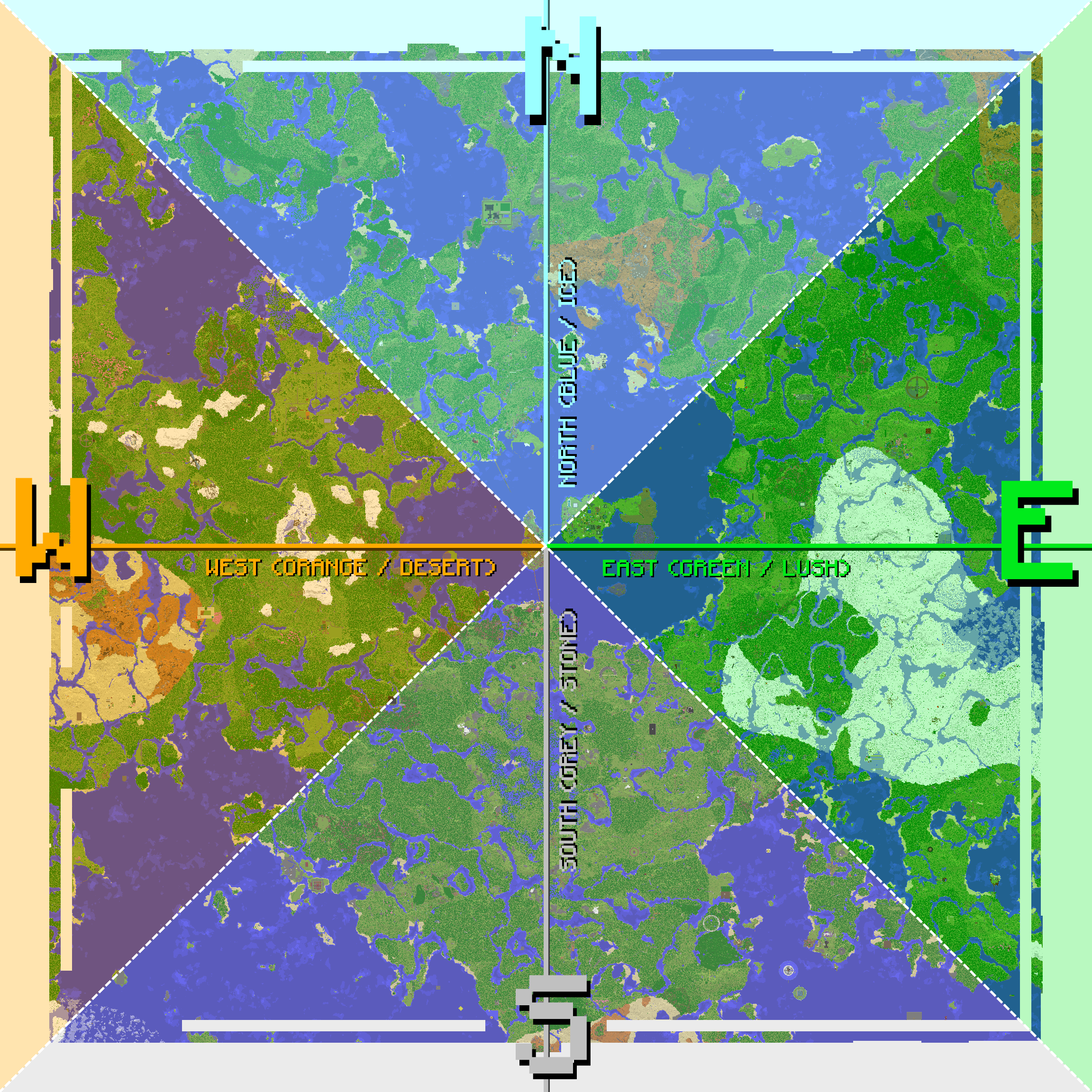
There are four main Nether tunnels: North, South, West, and East. Your tunnel is determined by the F3 coordinates of your base, depending on:
a) whether the X or Z coordinate is closer to 0
b) whether it is positive or negative:
- Positive X: East Tunnel
- Negative X: West Tunnel
- Positive Z: South Tunnel
- Negative Z: North Tunnel
Example
A base at x-500, z1110 is closer to 0 on its x coordinate. As x is negative, the base connects to West Tunnel.
Enter your base coordinates to find your Nether tunnel
Nether tunnels must be built at y111, and spawn-proofed, either by using clear ice for the floor or with buttons, pressure plates, carpets, etc. You can find many examples along our four main Nether tunnels.
Roads Project
- There is currently an optional server-wide project to connect most bases via a single Overworld road network, for aesthetics and players who wish to explore the server on horse or by foot.
- When building any paths or roads on the server:
- Check with your neighbours before placing any paths near their bases.
- Make sure your path connects aesthetically to roads that other players have built.
- If you are unsure how to do so then ask for help, but don't change blocks that others have placed.
- If you would like to join this project, see the discussion thread for Overworld Road Project.