Server Architecture
Introduction

Our game servers are hosted on a dedicated Ubuntu server in Falkenstein, Germany, rented from Hetzner as a custom AX42-U machine. Alongside the standard 2x 512GB SSDs configured in RAID for our SMP servers, we’ve added a 1TB SSD for the non-SMP game servers, and a 22TB HDD for miscellaneous server backups and cold storage.
To manage our game servers on this Ubuntu server, we use the Pterodactyl server management panel.
Game Servers
Pterodactyl runs all of our game servers in isolated Docker containers. We can then manage these game servers through the Pterodactyl UI panel, or the SFTP access it provides.
flowchart TD
    subgraph server["Dedicated Ubuntu Server"]
        direction TB
        pterodactyl["🐦🎮\nPterodactyl"]
        subgraph games["Game Servers"]
            direction LR
            survival["🐳\nSurvival"]
            resource["🐳\nResource"]
            passage["🐳\nPassage"]
            creative["🐳\nCreative"]
            snapshot["🐳\nSnapshot"]
            misc["🐳\nMisc. Servers"]
        end
    end

    pterodactyl --> survival
    pterodactyl --> resource
    pterodactyl --> passage
    pterodactyl --> creative
    pterodactyl --> snapshot
    pterodactyl --> misc

    classDef pdactyl stroke:#26519A,stroke-width:3px
    classDef container stroke:#3d8ec9,stroke-width:2px

    class pterodactyl pdactyl
    class survival,resource,passage,creative,snapshot,misc container

    style server stroke:#5c9fd6,stroke-width:1px
    style games stroke:#8fae7a,stroke-width:1px

    linkStyle default stroke:#3d8ec9,stroke-width:1.5px
Proxy Network
We use a BungeeCord server (also known as our Proxy) to connect several of our servers together, synchronising features such as player list and chat between them to create a shared Survival experience.
Our proxy network handles connections to and from the Survival, Resource, and Passage servers that sit 'below' the Proxy in the hierarchy, and these servers are collectively considered to be our Main server.
---
config:
  flowchart:
    nodeSpacing: 10
---
flowchart LR
    direction LR
    subgraph nonbungee["Game Servers"]
        subgraph fakeproxy2["NoProxy"]
            direction TB
            misc["🐳\nMisc. Servers"]
            fakeserver2["🐳\ntest 2"]
        end
        subgraph fakeproxy1["NoProxy"]
            direction TB
            snapshot["🐳\nSnapshot"]
            fakeserver1["🐳\ntest2"]
        end
        subgraph fakeproxy["NoProxy"]
            direction TB
            creative["🐳\nCreative"]
            fakeserver["🐳\ntest"]
        end
        subgraph bungee["Proxy Network"]
            direction TB
            proxy["🐳\nProxy"]
            survival["🐳\nSurvival"]
            resource["🐳\nResource"]
            passage["🐳\nPassage"]
        end
    end

    proxy <--> survival
    proxy <--> resource
    proxy <--> passage

    creative ~~~ fakeserver
    snapshot ~~~ fakeserver1
    misc ~~~ fakeserver2


    classDef container stroke:#3d8ec9,stroke-width:2px
    classDef invisible fill-opacity:0, stroke-opacity:0, color:#0000;

    class proxy,survival,resource,passage container
    class fakeproxy,fakeproxy1,fakeproxy2,fakeserver,fakeserver1,fakeserver2 invisible


    style bungee stroke:#8fae7a,stroke-width:1px

    linkStyle 0 stroke:#2e7d32,stroke-width:2px
    linkStyle 1 stroke:#2e7d32,stroke-width:2px
    linkStyle 2 stroke:#2e7d32,stroke-width:2px
Staging Network
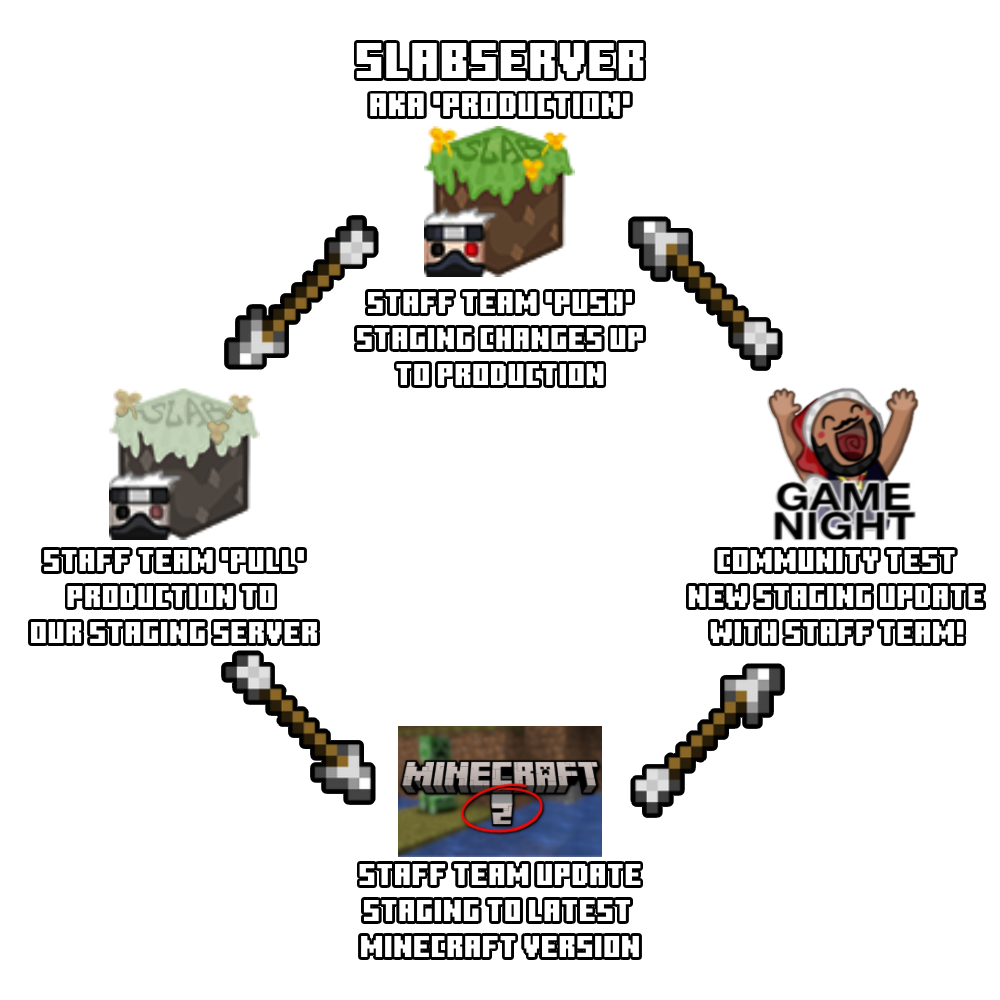
The Main server has an equivalent Test server (also known as Staging), where we prepare server upgrades.
As Minecraft updates increased in frequency from game drops, and became more technically complex, the work required to update our plugins, datapacks, and server configuration has also increased alongside it.
With our Staging setup, we are able to 'pull' everything from Main to the Staging server, update our plugins and datapacks, and then 'push' those changes up to Main.
This lets us gradually prepare Staging over several days, test Staging before 'pushing' the changes, and minimise how long Slabserver is offline for the 'push' update. This is all managed via a bespoke CLI tool known as SlabCLI.
Bots
Our bots are also hosted on the Ubuntu server and managed via Pterodactyl, just like any of our game servers. This helps the staff team to configure and manage most of our staff applications through a single application.
flowchart TD
    subgraph server["Dedicated Ubuntu Server"]
        direction TB
        pterodactyl["🐦🎮\nPterodactyl"]
        subgraph bots["Bots"]
            direction LR
            modbot["🐳\nModbot"]
            modmailbot["🐳\nModmail Bot"]
            applicationbot["🐳\nApplication Bot"]
            playerlistbot["🐳\nPlayerlist Bot"]
            musicbot["🐳\nMusic Bot"]
            ergobot["🐳\nErgoBot"]
        end
    end

    pterodactyl --> modbot
    pterodactyl --> modmailbot
    pterodactyl --> applicationbot
    pterodactyl --> playerlistbot
    pterodactyl --> musicbot
    pterodactyl --> ergobot

    classDef pdactyl stroke:#00337a,stroke-width:3px
    classDef container stroke:#3d8ec9,stroke-width:2px

    class pterodactyl pdactyl
    class ergobot,musicbot,playerlistbot,modmailbot,modbot,applicationbot container

    style server stroke:#5c9fd6,stroke-width:1px
    style bots stroke:#8fae7a,stroke-width:1px

    linkStyle default stroke:#3d8ec9,stroke-width:1.5px
We run bots on our dedicated server for the following use cases:
- Modbot
Shares IPs, posts FAQs, checks pings, converts timezones, restarts servers, sends reminders, posts our Etho-themed join messages, assigns Snacker, Inactive, and self-assigned #welcome roles (and does plenty more!) - Modmail Bot
Forwards any DM or completed Member Report that you send @Chester to a private staff channel - Appbot
Sends server applications to an#applicationschannel, and whitelist commands to our servers - Playerlist Bot
Checks player count and player statuses across the Proxy servers when!playerlistis used in#ingamechat - Music Bot
Plays YouTube and Soundcloud songs in our voice channels, utilising a publicly available bot - ErgoBot
Runs automation tasks on our Pterodactyl servers based on API responses from external services, for example Mojang's version manifest
Backups
Full Backups
Internal backups of our game servers are made daily, in the early EU hours. These backups are also uploaded to a private cloud storage bucket on Backblaze, offering us data redundancy via their relatively cheap external storage compared to other providers.
We currently keep 7 days worth of daily backups on both our dedicated server and Backblaze, as well as 4 weeks worth of weekly backups on Backblaze.
Incremental Backups
Our Incremental backups run via a combination of Restic and Backblaze. Restic provides an automated incremental backup solution for all our server data, and Backblaze fulfils the same private cloud storage purpose as described in the Full Backups section above.
We currently keep between 28 and 42 days worth of incremental backups on Backblaze, to balance the amount of available backups with the costs of storing and pruning this data. Pruning to 28 days is automatically run by a cronjob on the 1st and 15th of each month.
flowchart TD
    subgraph server["Dedicated Ubuntu Server"]
        subgraph games["Game Servers"]
            direction LR
            survival["🐳\nSurvival"]
            resource["🐳\nResource"]
            passage["🐳\nPassage"]
            creative["🐳\nCreative"]
            snapshot["🐳\nSnapshot"]
            misc["🐳\nMisc. Servers"]
        end
        restic(("🔄 Restic"))
    end
    backblaze["🔥 Backblaze B2 Storage"]

    survival <--> restic
    resource <--> restic
    passage <--> restic
    creative <--> restic
    snapshot <--> restic
    misc <--> restic
    restic <--> backblaze

    classDef container stroke:#3d8ec9,stroke-width:2px
    classDef restic stroke:#a81c2b,stroke-width:2px
    classDef backblaze stroke:#7a1420,stroke-width:3px

    class survival,resource,passage,creative,snapshot,misc container
    class restic restic
    class backblaze backblaze

    style server stroke:#5c9fd6,stroke-width:1px
    style games stroke:#8fae7a,stroke-width:1px

    linkStyle default stroke:#a81c2b,stroke-width:1.5px